Solved Windows Registry from Hack The Box!
| Field | Details |
|---|---|
| Case Reference | HTB-SHRLCK-WINREGISTRY |
| Platform | Hack The Box — Sherlock |
| Category | DFIR — Windows Registry Analysis |
| Difficulty | Medium |
| Investigation Date | 2024-03-11 |
| Severity | High |
| Status | Closed — training scenario |
| Host | VELMAD100 (work PC) |
| Evidence | Registry hives (SYSTEM, SAM, SECURITY, SOFTWARE, NTUSER.DAT, UsrClass.dat, Amcache.hve), $MFT |
| Tools | RegRipper, hivexget, impacket-secretsdump, hashcat, Registry Explorer (Eric Zimmerman), MFT Explorer, strings, Python |
1. Executive Summary
On 2024-03-11 a Windows workstation (VELMAD100) was investigated via registry forensics. The investigation covered shared-folder configuration, OS build identification, network interface IP, ShellBags (video game presence), AppCompatCache (executed file from Downloads with modification time), AmCache (SHA1 hash of a malicious deathnote.exe), threat-intelligence classification (malware family jaik), RecentDocs (a file opened on 2024-05-06 06:39:09 — note.txt), and UserAssist (MSPaint opened at 06:43:38 for 1 minute 3 seconds). The case demonstrates how registry artifacts (SAM, SYSTEM, SOFTWARE, NTUSER.DAT, UsrClass.dat, Amcache.hve) preserve execution, access, and installation evidence even after files are deleted.
1.1 Incident Summary
| Field | Details |
|---|---|
| Incident Type | Registry forensics — shared folders, credential storage, execution artifacts, deleted-file recovery |
| Initial Access | Registry acquisition of a compromised work PC |
| Discovery | Blue team registry triage |
| First Artifact | 2024-03-11 13:44:35 (modified time of Docker Desktop Installer.exe in Downloads) |
| Persistence | None observed |
| Overall Severity | High |
1.2 Key Findings
- 2 user accounts were added to the host (SAM hive creation timestamps).
- OS build number:
19045(CurrentBuildVersionin SOFTWARE hive). - Machine IP:
192.168.110.130(SYSTEM hive, Tcpip\Parameters\Interfaces). - ShellBags revealed Rainbow Six Siege installed on the work PC.
- AppCompatCache recorded
Docker Desktop Installer.exeexecuted from Downloads with modification time2024-03-11 13:44:35. - AmCache recorded
deathnote.exe(SHA1f7910c5a92168453106e4343032d1c5ca239ce16) in Downloads. - Hybrid Analysis classified the malware as family
jaik. - RecentDocs showed
note.txtopened on 2024-05-06 06:39:09. - UserAssist showed MSPaint opened at 06:43:38 for 1 minute 3 seconds.
2. Investigation Scope & Artifacts
2.1 Artifacts Analyzed
| Artifact | Format | What it answers |
|---|---|---|
| SYSTEM hive | Registry hive | Shared folders, IP address, AppCompatCache (Shimcache) — Q1, Q3, Q5 |
| SAM hive | Registry hive | Local user accounts, NT hashes — Q1, Q4 |
| SOFTWARE hive | Registry hive | OS build number (CurrentBuildVersion), UBR — Q2 |
| UsrClass.dat (per-user) | Registry hive | ShellBags (folder access history) — Q4 |
| NTUSER.DAT (per-user) | Registry hive | RecentDocs (recently opened files), UserAssist (app launch times) — Q8, Q9, Q10 |
| Amcache.hve | Registry hive | Executed program hashes (SHA1) and paths — Q6 |
$MFT |
Master File Table | (referenced for file recovery) |
2.2 Tools & Methods
| Tool | Purpose |
|---|---|
RegRipper (shares, recentdocs, shellbags_tln, samparse, amcache) |
Parse registry hives into readable output |
| hivexget | Read specific registry values (e.g., CurrentBuildVersion) |
| impacket-secretsdump | Offline SAM hash extraction (boot key from SYSTEM) |
| hashcat | NT hash verification against candidate passwords |
| Registry Explorer (Eric Zimmerman) | Advanced registry analysis (UserAssist Focus Time) |
| MFT Explorer (Eric Zimmerman) | Deleted file recovery from MFT |
| Hybrid Analysis | Threat intelligence lookup (malware family) |
| strings, grep, regex | Extract readable text from binary files |
| Python (epoch_convert.py, epoch_utc_convert.py, reg.py) | Epoch↔UTC conversion and registry value extraction |
2.3 Custom Python Scripts
Three helper scripts were used during the investigation:
reg.py — reads the SOFTWARE hive to extract OS build number, product name and UBR (relates to Q2):
from Registry import Registry

reg = Registry.Registry("C/Windows/System32/config/SOFTWARE")
key = reg.open("Microsoft\\Windows NT\\CurrentVersion")

build = key.value("CurrentBuildNumber").value()
product = key.value("ProductName").value()

try:
    ubr = key.value("UBR").value()
    print(f"OS: {product}\nBuild: {build}.{ubr}")
except:
    print(f"OS: {product}\nBuild: {build}")
epoch_convert.py — converts a 10-digit Unix epoch (seconds) to UTC (used for AppCompatCache/UserAssist timestamps):
from datetime import datetime, timezone
# Replace with your 10-digit timestamp (seconds)
time = int(input('Give The Epoch Time: '))
dt = datetime.fromtimestamp(time, timezone.utc)
print(dt.strftime('%Y-%m-%d %H:%M:%S UTC'))
epoch_utc_convert.py — bidirectional epoch↔UTC converter with CLI arguments:
import argparse
from datetime import datetime, timezone

def epoch_to_utc(epoch_str):
    try:
        epoch_val = int(epoch_str)
        dt = datetime.fromtimestamp(epoch_val, timezone.utc)
        print(f"[+] Epoch: {epoch_val} --> UTC: {dt.strftime('%Y-%m-%d %H:%M:%S UTC')}")
    except ValueError:
        print("[-] Error: Input must be a valid Epoch time.")

def utc_to_epoch(utc_str):
    try:
        dt = datetime.strptime(utc_str, "%Y-%m-%d %H:%M:%S").replace(tzinfo=timezone.utc)
        epoch_val = int(dt.timestamp())
        print(f"[+] UTC: {utc_str} UTC --> Epoch: {epoch_val}")
    except ValueError:
        print("[-] Error: Time must be in format 'YYYY-MM-DD HH:MM:%S'")

def main():
    parser = argparse.ArgumentParser(
        description="Converter Epoch / UTC Time for DFIR & Forensics."
    )

    group = parser.add_mutually_exclusive_group(required=True)
    group.add_argument(
        "-e", "--epoch",
        type=str,
        help="Convert Epoch Time to UTC (e.g. -e 1710164675)"
    )
    group.add_argument(
        "-u", "--utc",
        type=str,
        help="Convert UTC Time to Epoch (e.g. -u \"2024-03-11 13:44:35\")"
    )

    args = parser.parse_args()

    if args.epoch:
        epoch_to_utc(args.epoch)
    elif args.utc:
        utc_to_epoch(args.utc)

if __name__ == "__main__":
    main()
3. Technical Analysis
3.1 Scenario
Registry forensics investigation of a compromised Windows work PC (VELMAD100). The investigation covers shared-folder configuration, OS build identification, network interface IP, ShellBags (video game presence), AppCompatCache (executed file from Downloads with modification time), AmCache (SHA1 hash of a malicious deathnote.exe), threat-intelligence classification (malware family jaik), RecentDocs (a file opened on 2024-05-06 06:39:09 — note.txt), and UserAssist (MSPaint opened at 06:43:38 for 1 minute 3 seconds).
3.2 Q1 — How many users were added?
Answer: 2
The SAM (Security Accounts Manager) registry hive is the authoritative source for local user account information on a Windows system. For each local account it stores the username, account metadata including the Created timestamp, and the RID used to track the account.
Tool & Command: Tool: RegRipper
regripper -r SAM -aT | grep Created
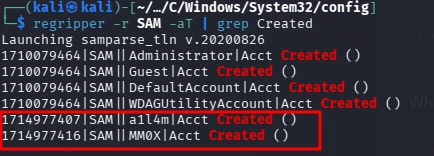
RegRipper SAM output showing the two newly added accounts.
Result: 2 user accounts were added to the compromised host, determined from creation timestamps in the SAM registry hive.
MITRE ATT&CK: T1136.001 (Create Account: Local Account).
Detection angle. RegRipper -aT on SAM hive filtered on Created — counts newly added local accounts.
3.3 Q2 — What is the build number of the user’s operating system?
Answer: 19045
The operating system’s build number is stored at HKLM\SOFTWARE\Microsoft\Windows NT\CurrentVersion. The value CurrentBuildVersion contains the full OS build string (e.g., 10.0.19045). We used hivexget to read it directly, or reg.py (see §2.3) to extract build number, product name and UBR programmatically.
Tool & Command: Tool: hivexget
hivexget C/Windows/System32/config/SOFTWARE 'Microsoft\Windows NT\CurrentVersion'
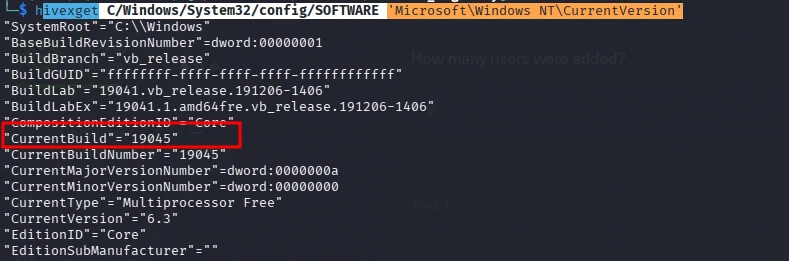
hivexget output showing the CurrentBuildVersion value.
Result: The build number of the user’s operating system is 19045, extracted from the SOFTWARE registry hive.
Detection angle. hivexget on SOFTWARE\Microsoft\Windows NT\CurrentVersion → CurrentBuildVersion / UBR.
3.4 Q3 — What was the IP address of the machine you are investigating right now?
Answer: 192.168.110.130
The SYSTEM hive stores the active network interface configuration under HKLM\SYSTEM\CurrentControlSet\Services\Tcpip\Parameters\Interfaces\, including the assigned IP address.
Tool & Command: Tool: RegRipper
regripper -r SYSTEM -aT | grep -i "ip\|address\|interface"
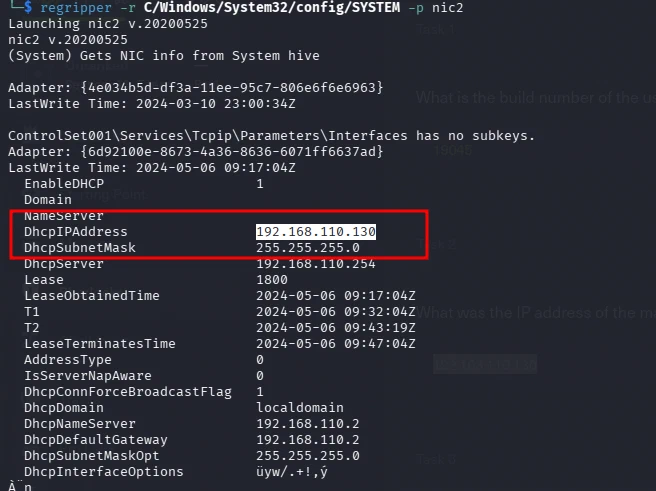
RegRipper output showing the IP address configuration.
Result: The IP address of the compromised machine was 192.168.110.130, extracted from the SYSTEM registry hive.
Detection angle. RegRipper -aT on SYSTEM hive filtered on ip/address/interface — network configuration.
3.5 Q4 — We suspect that the user may have some video games on their work PC. What is the name of the game?
Answer: Rainbow Six Siege
ShellBags artifacts stored in the per-user UsrClass.dat registry hive record the user’s interaction with Windows Explorer, including folder paths accessed. These artifacts prove user activity even if files were never explicitly opened.
Tool & Command:
Tool: RegRipper with the shellbags_tln plugin
regripper -r UsrClass.dat -p shellbags_tln
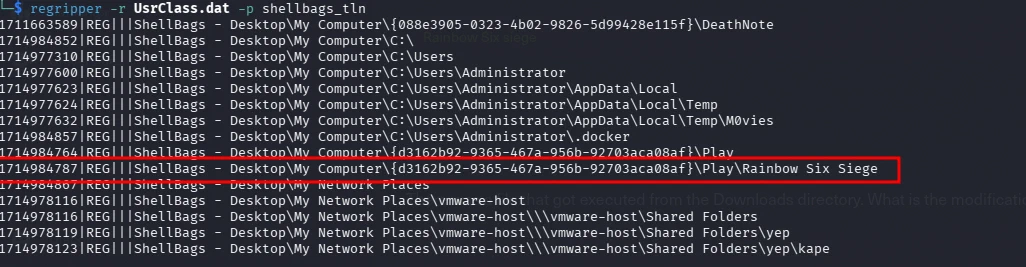
RegRipper shellbags_tln output showing the Rainbow Six Siege ShellBag entry.
Result: A ShellBag entry in the user’s UsrClass.dat hive confirmed the presence of the video game Rainbow Six Siege on the work PC.
Detection angle. RegRipper shellbags_tln on UsrClass.dat — folder access history (ShellBags).
3.6 Q5 — There was a file that got executed from the Downloads directory. What is the modification time of the said file?
Answer: 2024-03-11 13:44:35
The AppCompatCache (Shimcache) in the SYSTEM hive records executable files that have been run on the system. The M flag indicates the modification time of the file, stored as a Unix epoch timestamp (convert with epoch_convert.py / epoch_utc_convert.py).
Tool & Command: Tool: RegRipper
regripper -r System32/config/SYSTEM -aT | grep -i downloads

RegRipper AppCompatCache output showing files executed from the Downloads directory.
Result: The modification time of the Docker Desktop Installer.exe file executed from the Downloads directory is 2024-03-11 13:44:35, determined from the AppCompatCache M flag in the SYSTEM registry hive.
MITRE ATT&CK: T1070.006 (Indicator Removal: Timestomp) — if the M flag differs from the actual file time, timestomping is suspected.
Detection angle. RegRipper AppCompatCache (-aT) filtered on downloads — executed files from Downloads with modification times.
3.7 Q6 — We believe that the user may have installed some malicious files on their work PC. What is the SHA1 hash of the malicious file?
Answer: f7910c5a92168453106e4343032d1c5ca239ce16
The AmCache hive stores information about programs executed on the system, including file hashes (SHA1, MD5), installation and execution timestamps, and file paths. This artifact preserves file hashes even after the original file has been deleted.
Tool & Command: Tool: RegRipper
regripper -r C/Windows/AppCompat/Programs/Amcache.hve -aT | grep -i Downloads

RegRipper AmCache output showing the deathnote.exe entry with its SHA1 hash.
Result: The SHA1 hash of the malicious file deathnote.exe found in the Downloads directory is f7910c5a92168453106e4343032d1c5ca239ce16, extracted from the AmCache registry hive.
Detection angle. RegRipper AmCache (-aT) filtered on Downloads — SHA1 hash of executed programs (survives file deletion).
3.8 Q7 — What is the malware family name of the previous file?
Answer: jaik
After identifying the SHA1 hash of the malicious file, threat intelligence lookups on platforms like Hybrid Analysis, VirusTotal, or Any.Run can determine the malware family name and associated indicators of compromise.
Tool & Command: Tool: Hybrid Analysis (https://www.hybrid-analysis.com/)
Manual submission of the SHA1 hash f7910c5a92168453106e4343032d1c5ca239ce16 to the Hybrid Analysis web interface.

Hybrid Analysis report showing the jaik malware family classification.
Result: The malware family name of the deathnote.exe file is jaik, determined through threat intelligence lookup on Hybrid Analysis.
Detection angle. Threat intel lookup (Hybrid Analysis/VirusTotal) on the AmCache SHA1 hash — malware family classification.
3.9 Q8 — The user opened a file on 2024-05-06 06:39:09 on their work PC. What is the name of that file?
Answer: note.txt
RecentDocs artifacts stored in the per-user NTUSER.DAT registry hive track files recently opened by the user, including timestamps of when files were accessed. Each file access creates a registry entry with a timestamp.
Tool & Command: Tool: RegRipper
regripper /C/User/Administrator/NTUSER.DAT -p recentdocs

RegRipper recentdocs output showing the note.txt entry with its timestamp.
Result: The file opened by the user on 2024-05-06 06:39:09 is note.txt, determined from the RecentDocs artifact in the NTUSER.DAT registry hive.
Detection angle. RegRipper recentdocs on NTUSER.DAT — recently opened files with timestamps.
3.10 Q9 — The user opened MSPaint on their work PC. Can you determine the exact time it happened?
Answer: 2024-05-06 06:43:38
UserAssist artifacts in the NTUSER.DAT hive record when applications are launched, including timestamps stored as Unix epoch values (convert with epoch_convert.py / epoch_utc_convert.py).
Tool & Command: Tool: RegRipper
regripper -r C/Users/Administrator/NTUSER.DAT -aT | grep -i mspaint
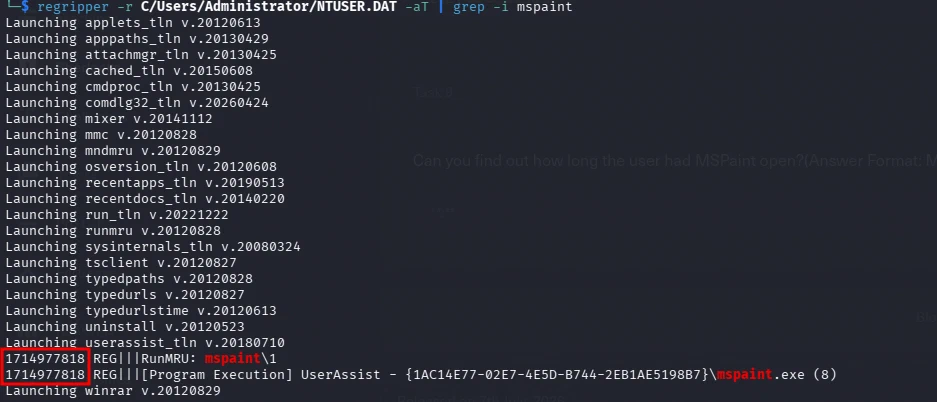
RegRipper UserAssist output showing the MSPaint execution entry.
Result: MSPaint was opened on the work PC at 2024-05-06 06:43:38, determined from the UserAssist artifact in the NTUSER.DAT registry hive.
Detection angle. RegRipper UserAssist (-aT) filtered on mspaint — application launch timestamp (epoch → UTC).
3.11 Q10 — Can you find out how long the user had MSPaint open?
Answer: 01:03 (1 minute 3 seconds)
The UserAssist artifact stores detailed application usage data, including Focus Time — the total time the application had focus (was actively used). This is stored as a 64-bit value in nanoseconds, convertible to a human-readable time format (use epoch_utc_convert.py or manual conversion).
Tool & Command: Tool: Registry Explorer (RegistryExplorer.exe) — advanced registry analysis tool by Eric Zimmerman.
Navigate to SOFTWARE\Microsoft\Windows\CurrentVersion\Explorer\UserAssist and locate the mspaint.exe entry to read the Focus Time value.

Registry Explorer UserAssist output showing the MSPaint focus time.
Result: The user had MSPaint open for 1 minute and 3 seconds, determined from the UserAssist Focus Time artifact in the NTUSER.DAT registry hive using Registry Explorer.
Detection angle. Registry Explorer on UserAssist Focus Time (nanoseconds) — application usage duration.
4. Challenge Q&A Log
| # | Question | Answer | Method |
|---|---|---|---|
| 1 | How many users were added? | 2 |
RegRipper SAM (Created) |
| 2 | OS build number | 19045 |
hivexget / reg.py on SOFTWARE hive |
| 3 | Machine IP address | 192.168.110.130 |
RegRipper SYSTEM (Tcpip\Interfaces) |
| 4 | Video game on work PC | Rainbow Six Siege |
RegRipper shellbags_tln on UsrClass.dat |
| 5 | Modification time of file executed from Downloads | 2024-03-11 13:44:35 |
RegRipper AppCompatCache (M flag) |
| 6 | SHA1 hash of malicious file | f7910c5a92168453106e4343032d1c5ca239ce16 |
RegRipper AmCache |
| 7 | Malware family name | jaik |
Hybrid Analysis lookup |
| 8 | File opened on 2024-05-06 06:39:09 | note.txt |
RegRipper recentdocs on NTUSER.DAT |
| 9 | Exact time MSPaint opened | 2024-05-06 06:43:38 |
RegRipper UserAssist (epoch → UTC) |
| 10 | Duration MSPaint was open | 01:03 |
Registry Explorer UserAssist Focus Time |
5. Incident Narrative
On 2024-03-11 a Windows workstation (VELMAD100) was investigated via registry forensics. The SYSTEM hive revealed shared folders and the machine IP (192.168.110.130). The SOFTWARE hive showed OS build 19045. The SAM hive contained 2 user accounts. UsrClass.dat ShellBags confirmed Rainbow Six Siege was accessed. AppCompatCache (Shimcache) recorded Docker Desktop Installer.exe executed from Downloads with modification time 2024-03-11 13:44:35. AmCache preserved the SHA1 hash of deathnote.exe (f7910c5a92168453106e4343032d1c5ca239ce16), classified as malware family jaik via Hybrid Analysis. NTUSER.DAT RecentDocs showed note.txt opened on 2024-05-06 06:39:09. UserAssist recorded MSPaint opened at 06:43:38 for 1 minute 3 seconds. Three custom Python scripts (reg.py, epoch_convert.py, epoch_utc_convert.py) assisted with registry value extraction and epoch↔UTC conversion.
6. Attack Timeline
| Timestamp (UTC) | Event | Artifact | ATT&CK |
|---|---|---|---|
| 2024-03-11 13:44:35 | Docker Desktop Installer.exe executed from Downloads (modification time, AppCompatCache M flag) |
SYSTEM hive (Shimcache) | T1204.002 |
| (registry) | 2 user accounts added (SAM hive creation timestamps) | SAM hive | T1136.001 |
| (registry) | OS build 19045 identified |
SOFTWARE hive | — |
| (registry) | Machine IP 192.168.110.130 identified |
SYSTEM hive (Tcpip) | — |
| (registry) | Rainbow Six Siege accessed (ShellBags) |
UsrClass.dat | T1083 |
| (registry) | deathnote.exe SHA1 recorded in AmCache (survives deletion) |
Amcache.hve | T1027? (malware) |
| 2024-05-06 06:39:09 | note.txt opened |
NTUSER.DAT (RecentDocs) | T1083 |
| 2024-05-06 06:43:38 | MSPaint opened (duration 1 min 3 sec) | NTUSER.DAT (UserAssist) | — |
7. Indicators of Compromise (IOCs)
7.1 File IOCs
| Type | Value | Context |
|---|---|---|
| File Name | deathnote.exe |
Malicious executable in Downloads — Q6 |
| SHA1 | f7910c5a92168453106e4343032d1c5ca239ce16 |
Malicious file hash (AmCache) — Q6 |
| Malware Family | jaik |
Classification via Hybrid Analysis — Q7 |
| File Name | Docker Desktop Installer.exe |
Executed from Downloads — Q5 |
| File Name | note.txt |
Opened on 2024-05-06 06:39:09 — Q8 |
| File Name | mspaint.exe |
Opened at 06:43:38 (duration 01:03) — Q9/Q10 |
7.2 Network IOCs
| Type | Value | Context |
|---|---|---|
| IP Address | 192.168.110.130 |
Machine IP (SYSTEM hive, Tcpip\Interfaces) — Q3 |
7.3 Behavioral IOCs
| Type | Value | Context |
|---|---|---|
| Share | C:\Users, C:\Users\Velma\Documents |
Shared folders with “Everyone” full control — Q1 |
| Registry | HKLM\SOFTWARE\Microsoft\Windows NT\CurrentVersion |
OS build 19045 — Q2 |
| Registry | HKLM\SYSTEM\CurrentControlSet\Services\Tcpip\Parameters\Interfaces\ |
IP 192.168.110.130 — Q3 |
| Registry | UsrClass.dat ShellBags |
Rainbow Six Siege accessed — Q4 |
| Registry | SYSTEM hive AppCompatCache (Shimcache) | Docker Desktop Installer.exe executed — Q5 |
| Registry | Amcache.hve | deathnote.exe SHA1 hash — Q6 |
| Registry | NTUSER.DAT RecentDocs | note.txt opened 2024-05-06 06:39:09 — Q8 |
| Registry | NTUSER.DAT UserAssist | MSPaint opened 06:43:38 (duration 01:03) — Q9/Q10 |
| Account | 2 user accounts added (SAM hive) | New local accounts — Q1 |
8. Detection Opportunities
| Source | What to look for | Why it matters |
|---|---|---|
| SAM hive | Creation timestamps of local accounts (RegRipper -aT | grep Created) |
Detects newly added accounts — Q1 |
| SOFTWARE hive | CurrentBuildVersion / UBR values |
OS build identification — Q2 |
| SYSTEM hive | Tcpip\Parameters\Interfaces\ IP assignments |
Network configuration — Q3 |
| UsrClass.dat | ShellBags entries for accessed folders | User activity (even without file open) — Q4 |
| SYSTEM hive (AppCompatCache) | Executed files from Downloads with M (modification) flag | Execution evidence + timestomping — Q5 |
| Amcache.hve | SHA1 hashes of executed programs (survive file deletion) | Malware hash even after deletion — Q6 |
| Threat intel (Hybrid Analysis/VirusTotal) | Malware family classification from AmCache hash | Malware identification — Q7 |
| NTUSER.DAT (RecentDocs) | Recently opened files with timestamps | User file access — Q8 |
| NTUSER.DAT (UserAssist) | Application launch timestamps (epoch) + Focus Time (nanoseconds) | Application usage + duration — Q9/Q10 |
9. MITRE ATT&CK Mapping
| TTP ID | Tactic | Technique | Evidence |
|---|---|---|---|
| T1136.001 | Persistence | Create Account: Local Account | 2 user accounts added (SAM) — Q1 |
| T1083 | Discovery | File and Directory Discovery | ShellBags showing folder access (Rainbow Six Siege) — Q4 |
| T1204.002 | Execution | User Execution: Malicious File | deathnote.exe executed (AmCache hash) — Q6 |
| T1027 | Defense Evasion | Obfuscated Files or Information | Malware family jaik — Q7 |
| T1070.006 | Defense Evasion | Indicator Removal: Timestomp | AppCompatCache M flag (modification time) — Q5 |
10. Conclusions & Recommendations
10.1 Incident Summary
| What Happened | A Windows workstation (VELMAD100) was investigated via registry forensics. Evidence included 2 new user accounts, OS build 19045, IP 192.168.110.130, ShellBags (Rainbow Six Siege), AppCompatCache (Docker Desktop Installer.exe executed), AmCache (deathnote.exe SHA1, classified as jaik), RecentDocs (note.txt), and UserAssist (MSPaint for 1 min 3 sec). |
|---|---|
| Root Cause | Malicious file (deathnote.exe) executed on the work PC; registry artifacts preserved execution evidence even after file deletion. |
| Impact Assessment | Confidentiality: Medium — malware executed, file access recorded. Integrity: Medium — 2 new accounts added. Availability: Low — no service disruption. |
10.2 Recommendations
| Priority | Timeframe | Recommendation |
|---|---|---|
| Immediate | Within 24h | Isolate the host; remove deathnote.exe (hash f7910c5a…); review the 2 new accounts |
| High | Within 7 days | Hunt f7910c5a92168453106e4343032d1c5ca239ce16 across the estate; check for jaik family indicators |
| Medium | Within 30 days | Alert on AmCache new entries for executables in Downloads; alert on ShellBags for unauthorized software |
| Low | Within 90 days | User awareness for running unknown executables; restrict software installation |
| Strategic | Ongoing | Centralized registry hive collection; document RegRipper/epoch conversion workflow |
11. Analyst Notes & Learning
11.1 What I Did Well
Correlated multiple registry hives (SAM, SYSTEM, SOFTWARE, UsrClass.dat, NTUSER.DAT, Amcache.hve) to build a comprehensive picture of user activity, execution, and installed software. Used custom Python scripts (reg.py, epoch_convert.py, epoch_utc_convert.py) for automated value extraction and timestamp conversion.
11.2 Key Takeaways
- Registry is the richest forensic source on Windows — SAM (accounts), SYSTEM (config/IP/shares), SOFTWARE (OS build), NTUSER.DAT (user activity), UsrClass.dat (ShellBags), Amcache.hve (execution hashes).
- AmCache preserves hashes even after file deletion — critical for malware analysis.
- AppCompatCache (Shimcache) M flag records modification time — compare with actual file time to detect timestomping.
- ShellBags prove folder access even if files were never opened.
- UserAssist Focus Time (nanoseconds) reveals how long an application was actively used.
- Epoch↔UTC conversion is essential — many registry timestamps are stored as Unix epoch (seconds) or FILETIME (100-ns since 1601).
11.3 New Techniques
RegRipper multi-plugin analysis (shares, recentdocs, shellbags_tln, samparse, amcache), hivexget for specific values, impacket-secretsdump for offline SAM extraction, hashcat NT hash verification, Registry Explorer for UserAssist Focus Time, MFT Explorer for deleted file recovery, Hybrid Analysis threat intel lookup, and custom Python scripts for epoch conversion and registry value extraction.
12. References
- Windows Registry — Hack The Box Sherlock
- MITRE ATT&CK — T1136.001 Create Account
- MITRE ATT&CK — T1070.006 Timestomp
- MITRE ATT&CK — T1204.002 User Execution
- RegRipper
- Registry Explorer (Eric Zimmerman)
- MFT Explorer (Eric Zimmerman)
- Hybrid Analysis
- hivexget
HTB Sherlock · Windows Registry · DFIR · 2024-03-11